
3 Best Kick Video, Live Stream, and Clips Downloader Tools - Browser Extensions, Online Tools, and Local Apps
Want to download videos, live streams, and clips from Kick? Use the Getvid Video Downloader extension. It supports over 2000 platforms, allowing you to instantly download any video you want and easily save it to your computer. This all-in-one tool eliminates the need to search for different download tools for various websites. Just install one extension to download videos from 2000+ sites. The process is ad-free, and download speeds don't rely on third-party servers, ensuring high-speed downloads. Besides Kick, this tool also works with platforms like Twitch, TikTok, Facebook Live, Instagram Live, and more.

Supports 2000+ Websites
One-Click Download to Folder
Auto Naming
What is Kick?
Kick emerged in 2022 as a new live streaming platform, focusing on high revenue sharing and liberal content policies, quickly becoming a strong competitor to Twitch. Since its launch, Kick has centered around a “creator-first” philosophy, attracting significant attention from streamers and viewers alike. It provides stable and efficient streaming technology, enabling users to enjoy high-definition live streams with minimal latency.
Which Tools Can Download Live Streams, Videos, and Clips from Kick?
Kick has been on the internet for a shorter time compared to other streaming sites, so there are fewer online tools available for downloading its content. This article introduces three of the best-tested tools for downloading Kick videos, live streams, and clips, covering online tools, browser extensions, and local applications. We compare their advantages and disadvantages to help users find the download tool that best suits their needs.
🧩 Method 1: Using Browser Extensions to Download Kick Videos
Using a browser extension to download Kick videos is one of the most convenient and stable methods.
These extensions typically have built-in download functionality, eliminating the need for manual URL copying or dealing with ads.
💡 Why Recommend This Method?
- ⚡ Faster Speed: Download speed depends entirely on your internet bandwidth, not limited by third-party servers.
- 🔒 More Secure: Extensions are reviewed and listed in official browser stores, offering more reliable security and privacy protection.
- 🧱 High Stability: Less susceptible to website restrictions or traffic fluctuations.
- 🔗 Multi-Platform Support: Besides Kick, it can also download videos from platforms like Twitch, TikTok, Facebook Live, Instagram Live, and more.
1️⃣ Using Getvid Video Downloader Extension (Recommended)
Pros
Multi-threaded download acceleration, 5-10 times faster
Absolutely no ads
Supports downloading long videos (over 3 hours)
Supports 2000+ platforms besides Kick
Supports downloading HLS, DASH, live streams, video recordings, image downloads, video segment extraction, GIF creation, audio or video removal, and more
Supports multiple simultaneous download tasks
No need to manually copy URLs and wait for parsing
Officially certified browser extension, risk-free
Very affordable subscription plan for unlimited downloads
Cons
Only available on desktop browsers
Usage Steps
This guide uses Chrome browser as an example (similar steps apply to Edge, Firefox, and other browsers).
- Install the Extension
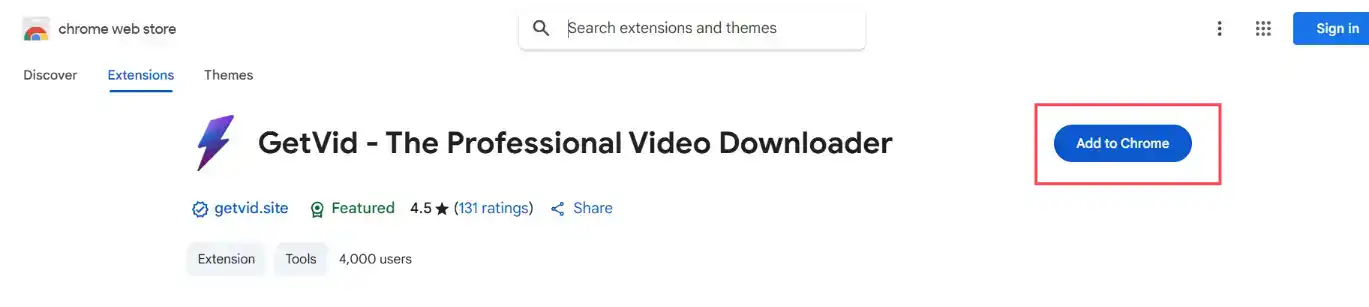
Go to the Chrome Web Store, click “Add to Chrome” and wait for the installation to complete.
- Log In to Your Account
After successful installation, click the extension icon in the toolbar and choose Register an account or sign in with Google.
Once logged in, you will immediately receive free download credits.
You can also choose Guest Mode, which offers unlimited downloads for MP4, WEBM, Facebook, Instagram, TikTok, Reddit, and other platforms.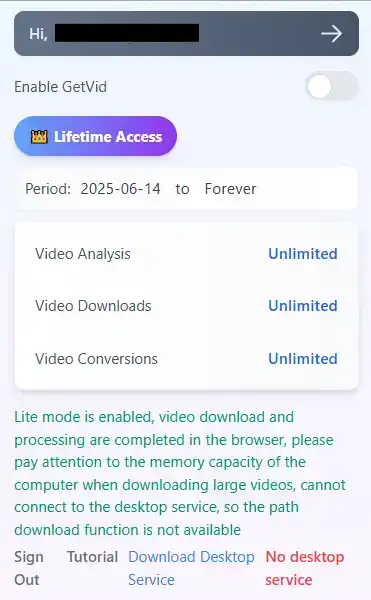
- Activate the Floating Tool
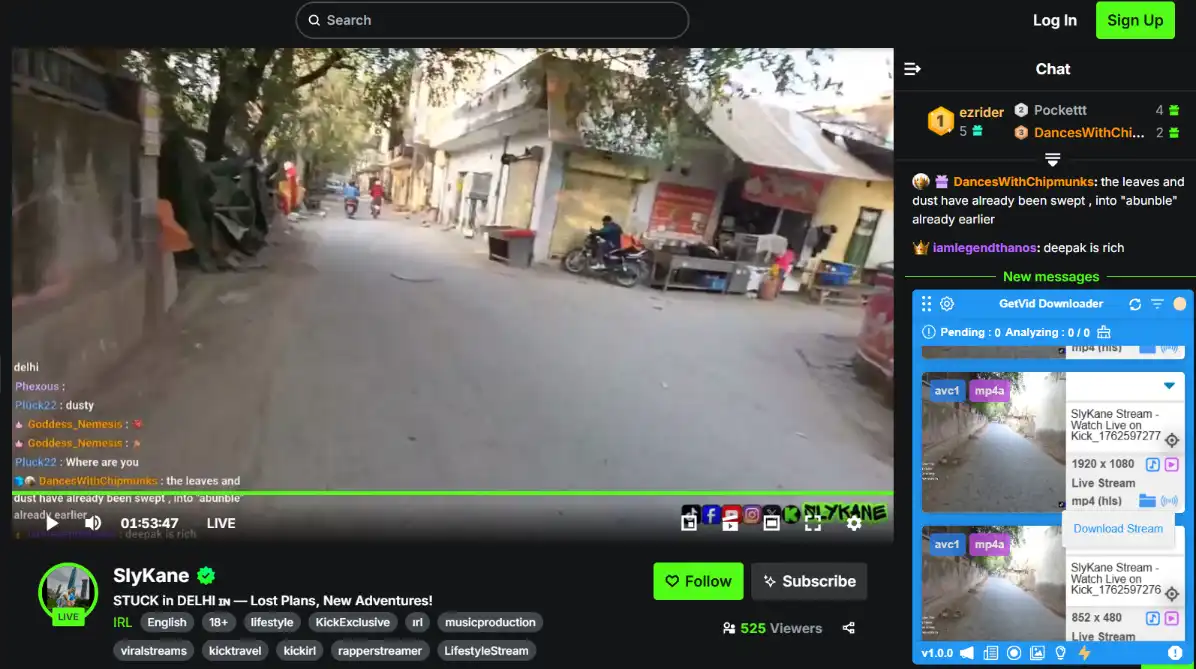
After logging in, a blue Getvid floating panel will appear in the bottom right corner of the screen.
Once the video is analyzed, all downloadable videos will be displayed here.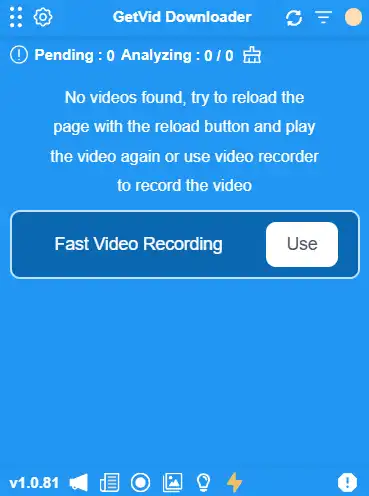
- Analyze and Download Videos (Clips)
Navigate to the Kick video page you want to download.
Wait for Getvid to automatically analyze the video and display all available resolution options.If you don’t see results, try manually switching the video quality, and the system will re-analyze.
After selecting the desired quality, click download and choose the destination folder.
Getvid also supports setting a “default download folder” for faster access.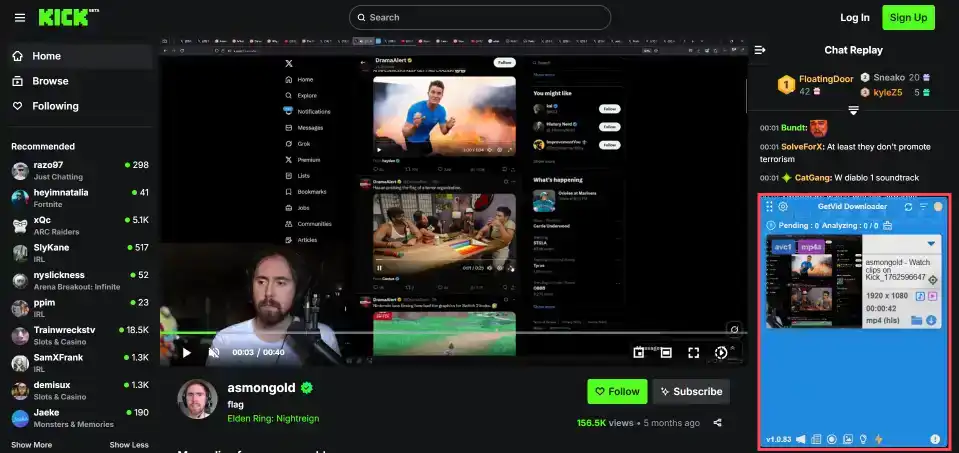
- Analyze and Download Live Streams
Follow the same steps: go to the live stream page, wait for Getvid to finish analyzing, select the live stream you want to download, click download, and choose the destination folder.
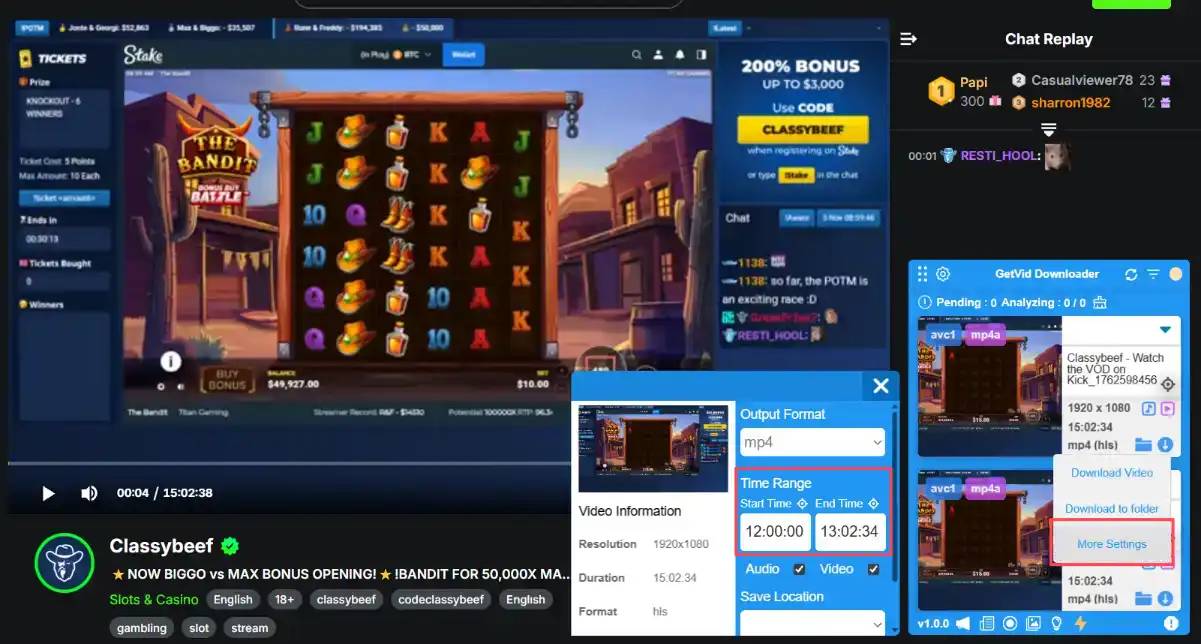
- Custom Range Download
Getvid allows users to select specific time segments of a video for download, saving space by avoiding downloading the entire file.
- View Download History
After downloading, you can view and manage your previously downloaded videos and live streams in the Download History section.
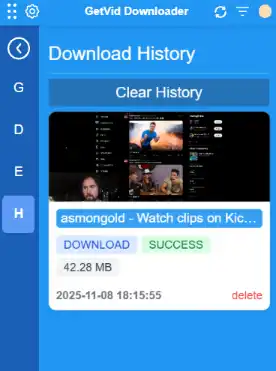
As you can see, Getvid provides a user-friendly and intuitive interface, making it easy to download videos, live streams, and clips from Kick for offline enjoyment. Try Getvid today!


2️⃣ Using Video DownloadHelper
Pros
Supports 1000+ platforms besides Kick
Supports downloading HLS, DASH, live streams.
Supports multiple simultaneous download tasks
No need to manually copy URLs and wait for parsing
Officially certified browser extension, risk-free
One-time purchase license for unlimited downloads
Cons
Cannot download long videos
Cannot customize download range
Only available on desktop browsers
Usage Steps
This guide uses Chrome browser as an example (similar steps apply to Edge, Firefox, and other browsers).
- Install the Extension
Go to the Chrome Web Store, search for Video DownloadHelper, then click “Add to Chrome” and wait for the installation to complete.
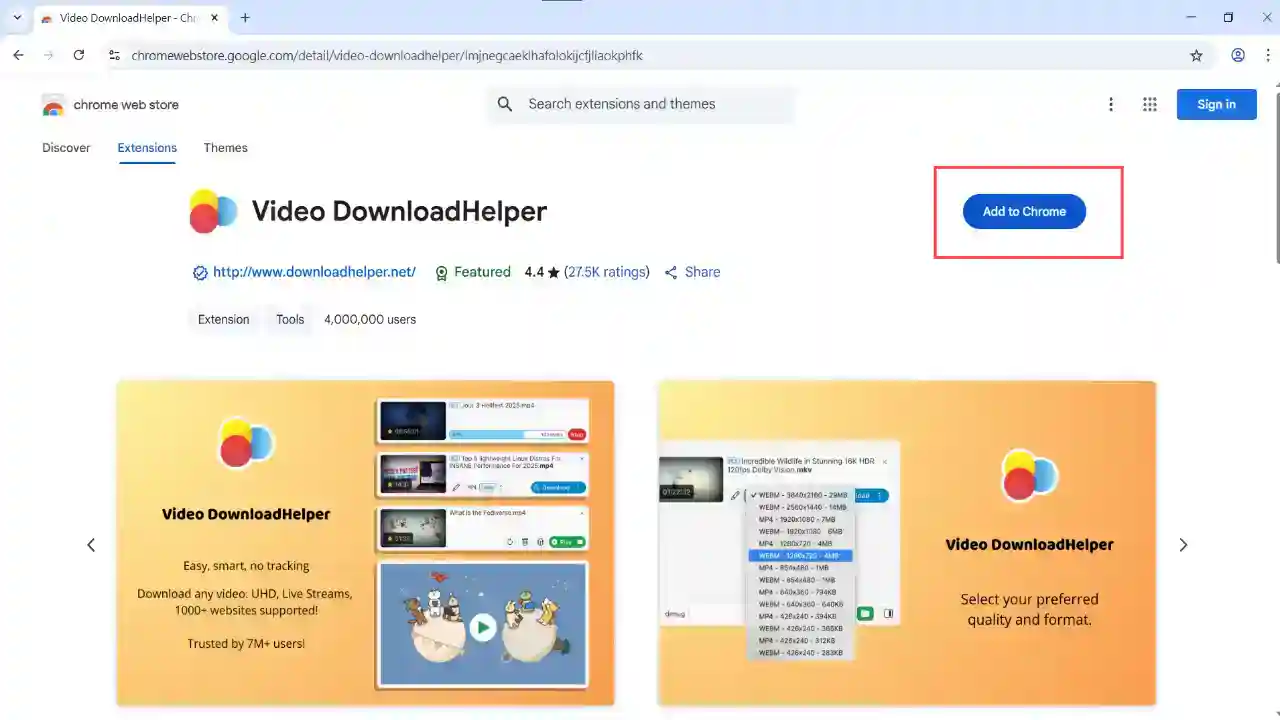
- Pin the Extension Icon
After installation, pin the extension to the browser toolbar for quick access and future use.
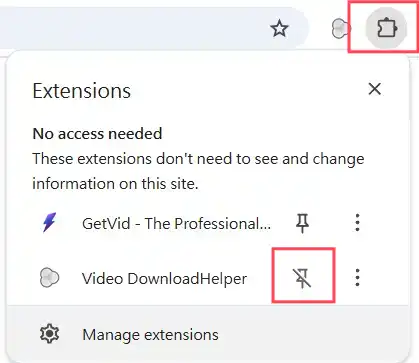
Analyze Video (Recordings, Clips, Live Streams)
Open the Kick video page you want to download.
Wait for Video DownloadHelper to automatically analyze the video. Once successful, the extension will show which videos are available for download and allow you to adjust the resolution if needed. Then click the download button.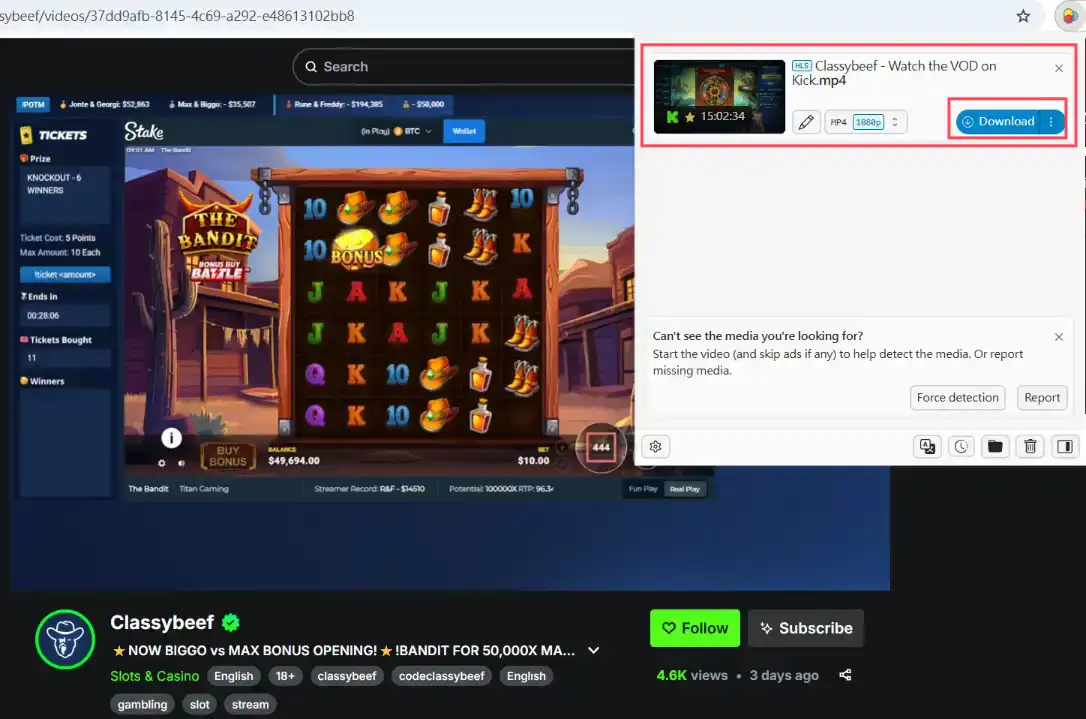
- Change Default Download Directory
In the extension’s settings, you can change the default download directory for quicker downloads to a specified location in the future.
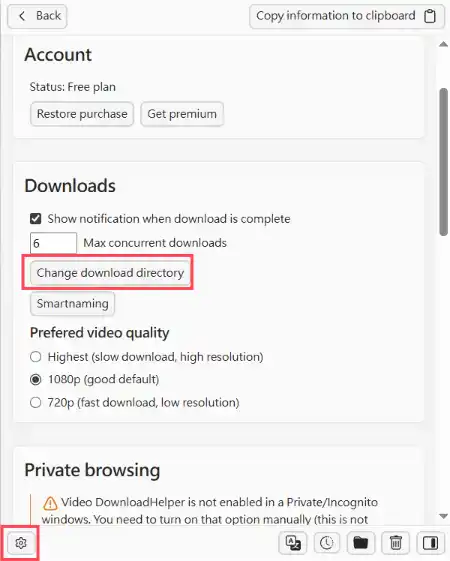
Video DownloadHelper is known for its simple operation and stable performance. With over 10 years of history, it holds a significant position in the video download extension market and is suitable for users who need to quickly download Kick videos.
🧩 Method 2: Using Online Tools to Download Kick Videos
Using online tools to download Kick videos is one of the most convenient download methods.
Currently, some online tools offer the ability to download Kick Clips and recorded videos (VODs),
but most do not support real-time live stream recording. If you need to record live streams, consider using a browser extension instead.
💡 What Are the Benefits of Using Online Tools?
- ⚡ Cross-Platform: Can be used on any device with a browser, including mobile devices like phones and computers.
- 🔒 No Login Required: No need to log into any account; just paste the URL to download.
- 🧱 Multiple Online Tool Options: Dozens of online tools are available to choose from.
1️⃣ Using Kick Clips Downloader to Download Clips
Kick Clips Downloader is an online tool specifically designed for downloading Kick Clips. It’s simple to use; just paste the URL to download.
Kick Clips Downloader WebsitePros
Supports downloading all Kick Clips
Supports downloading Clips of any length
Usable on both mobile and computer
No account login required
Cons
Cannot download live streams
Cannot download recorded videos (VODs)
No multi-threaded accelerated download
Cannot customize download range
Usage Steps
Copy the URL of the Clip you want to download. On the web version, simply copy the current page URL. On the mobile app, press the share button and tap “Copy Link”.
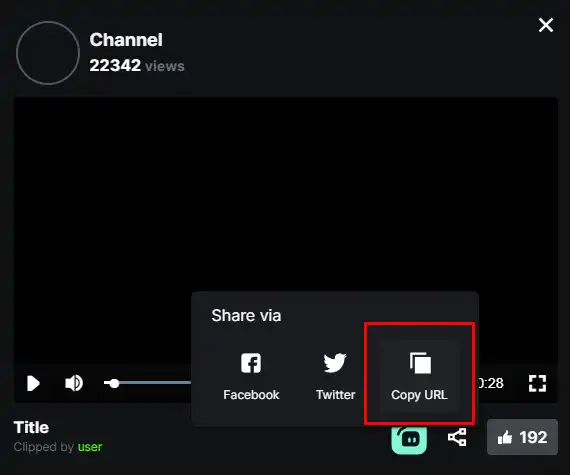
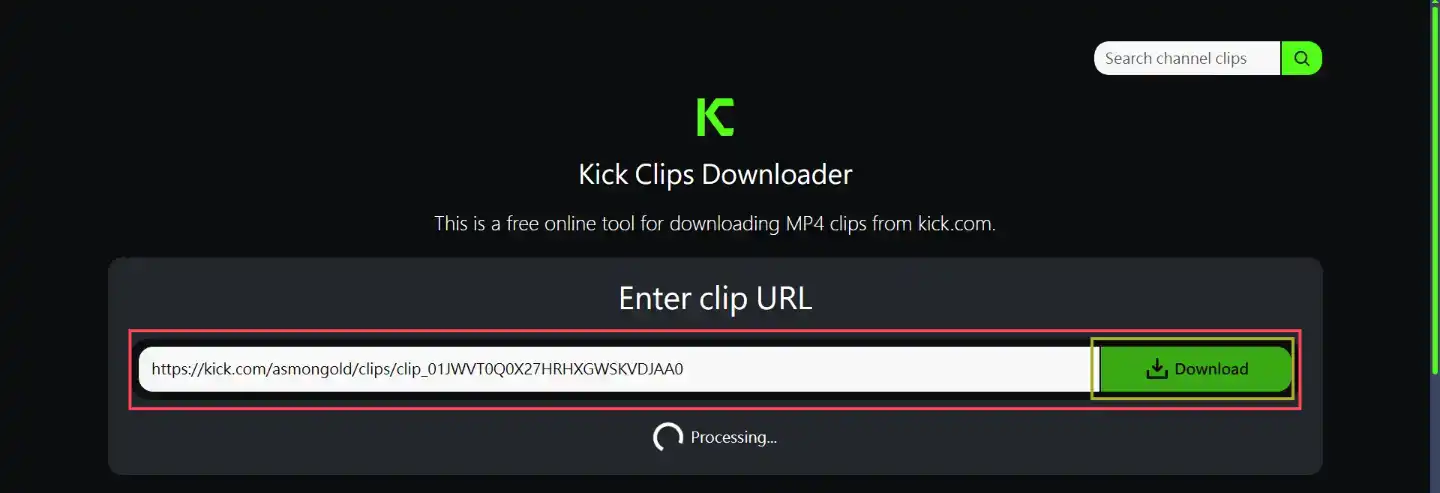
Go to the Kick Clips Downloader website, paste the Clip URL, and click the “Download” button. Wait for the analysis.
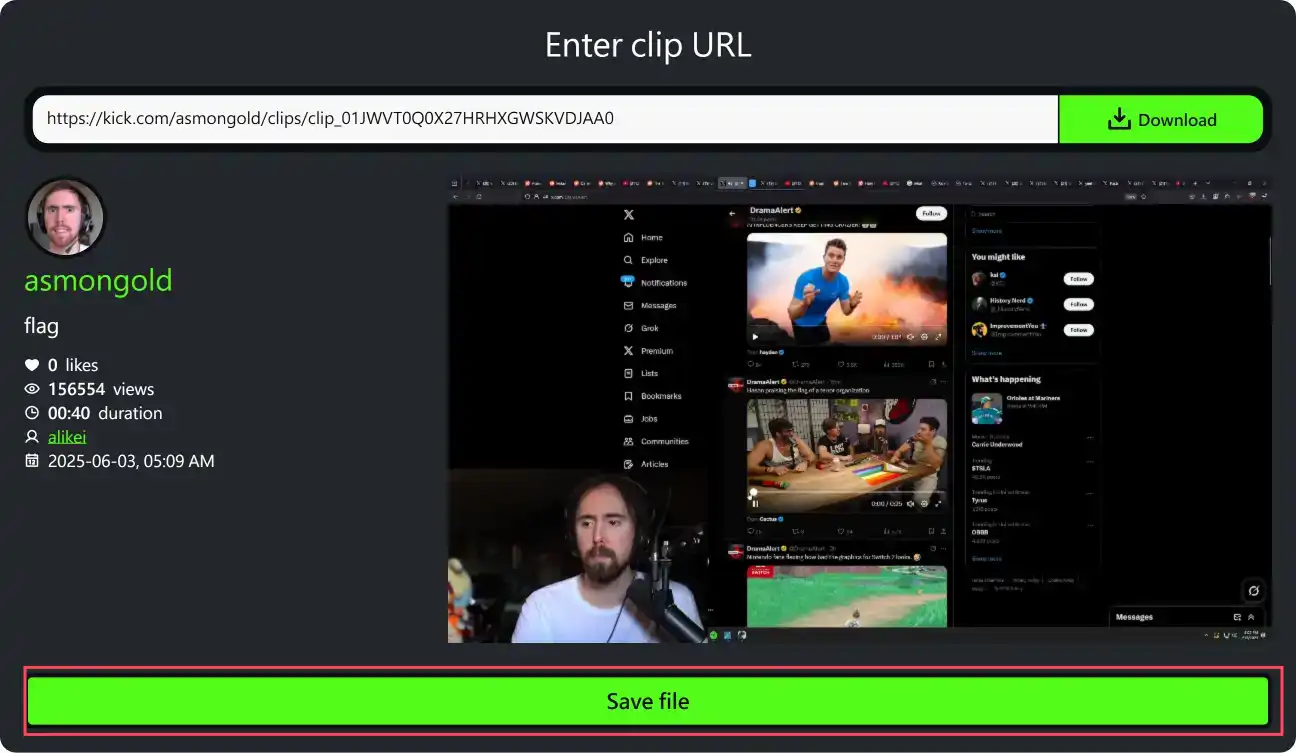
After a moment, a video preview and information will appear below. Click “Save File” to download.
2️⃣ Using Kick Downloader to Download Recorded Videos (VODs)
Kick Downloader is an online tool specifically for downloading Kick recorded videos (VODs), supporting downloads of unlimited length.
Kick Downloader WebsitePros
Supports downloading all Kick recorded videos (VODs)
Supports downloading recorded videos of any length
Usable on both mobile and computer
No account login required
Can customize download quality and range
Cons
The actual file is a TS file, not a true MP4
Cannot download live streams
Does not support downloading Clips
Usage Steps
Copy the URL of the recorded video (VOD) you want to download. On the web version, simply copy the current page URL. On the mobile app, press the share button and tap “Copy Link”.
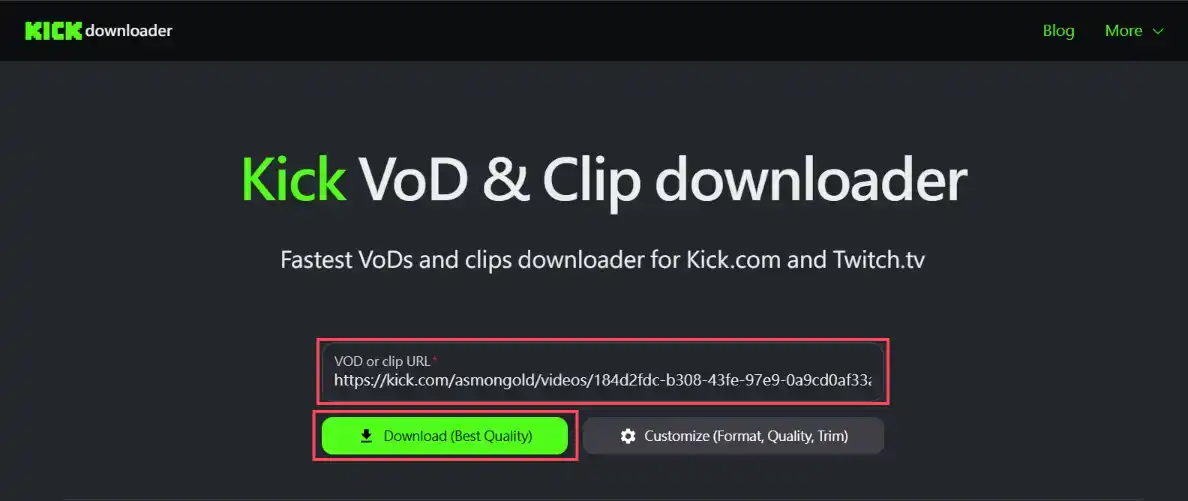
Go to the Kick Downloader website, paste the recorded video URL, and click the “Download (Best Quality)” button. Wait for the analysis.
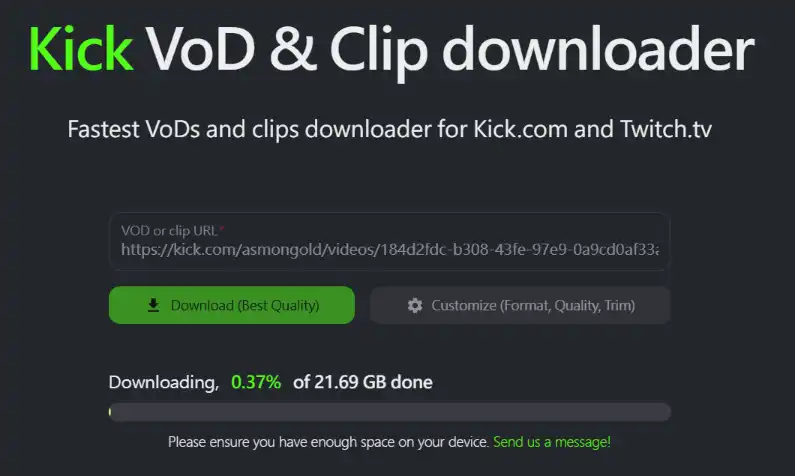
After analysis, a file save dialog will appear. Choose your desired download location and filename to start the download. If your file is very large (over 5GB), you may need to wait for the file to be written after the download completes, depending on the file size and your disk write speed.
Besides downloading the best quality, you can also choose “Customize (Format, Quality, Trim)” in step 2 to customize the downloaded file.
WarningBased on testing, regardless of whether you select TS or MP4 format, the downloaded file is actually a TS file, not a true MP4 file. If you need an MP4 file, consider using the Getvid Video Downloader extension or convert the file format yourself.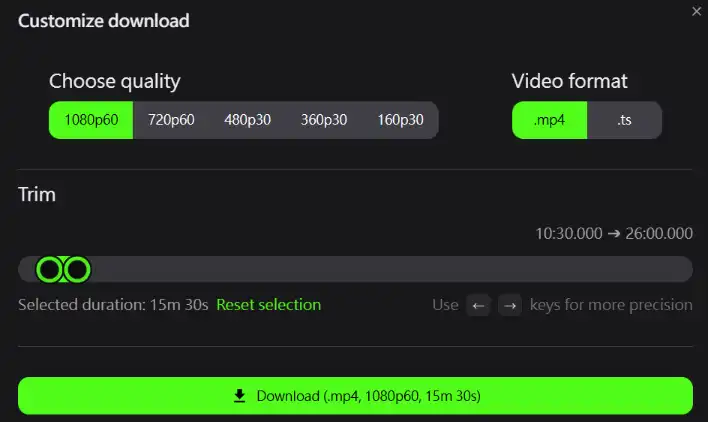
🧩 Method 3: Using yt-dlp to Download Kick Videos
yt-dlp is a very powerful open-source tool that supports downloading all types of videos from Kick, including recorded videos (VODs), live streams, and Clips. It also supports customizing download quality, range, and offers various command-line options.
Pros
Completely free
Supports downloading recorded videos of unlimited length
Supports customizing download quality and range
Supports downloading Clips
Supports downloading live streams
Cons
Requires manual link copying
Requires command-line operation
Advanced features require learning command-line usage
Operation Steps
- Get yt-dlp
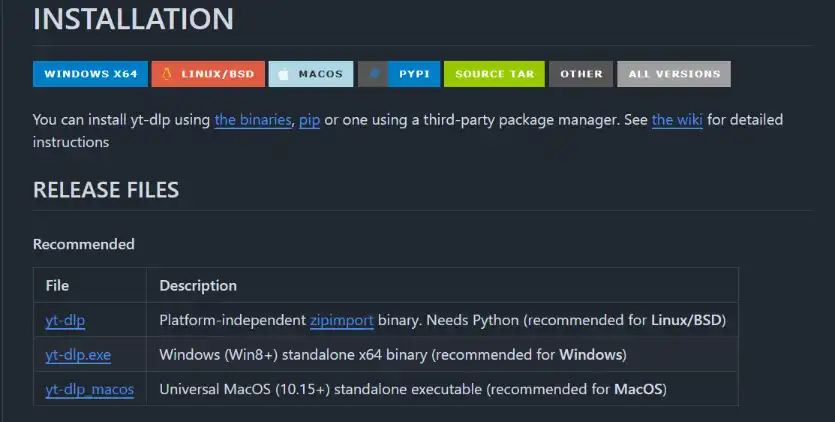
Go to the yt-dlp GitHub page, scroll down to the INSTALLATION section, and select the installation version corresponding to your operating system. This article uses Windows as an example; please select the second option.
After downloading, place the program in a folder. It is recommended that the folder path uses only English letters and avoids spaces to prevent parsing errors.
 WarningIf you double-click the executable directly, you will see the message: “yt-dlp.exe: error: Do not double-click the executable, instead call it from a command line.” This means the program cannot be started directly and must be operated via the command line.
 - Launch yt-dlp via Command Line
Open the folder where you placed yt-dlp, right-click in an empty space, and select “Open command window here” or “Open PowerShell window here”. This will open a new command-line window from the current path.
You can use cmd or PowerShell.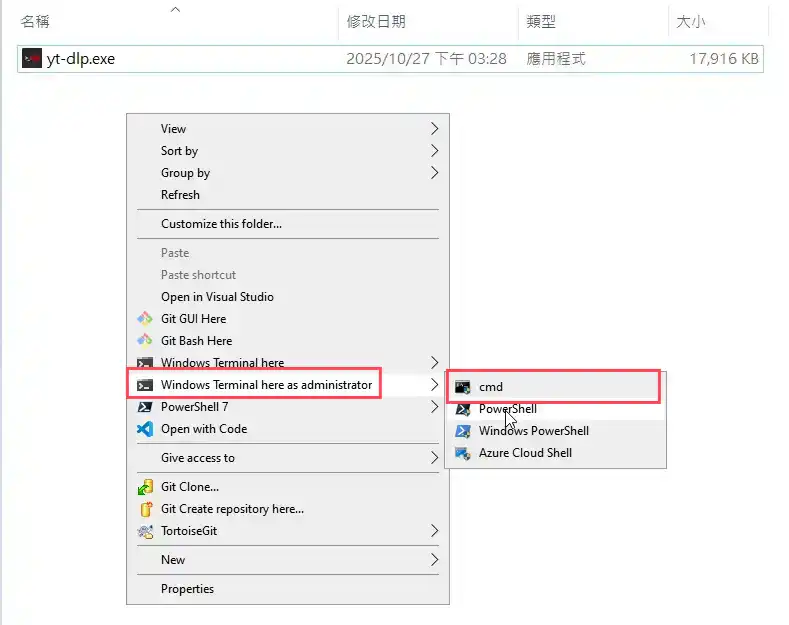
- Verify Successful Installation
In the command prompt window, type
.\yt-dlp --version(must include.\at the front). If the version number is displayed, the installation was successful.
If an error occurs, the opened path might be incorrect; please double-check the folder location.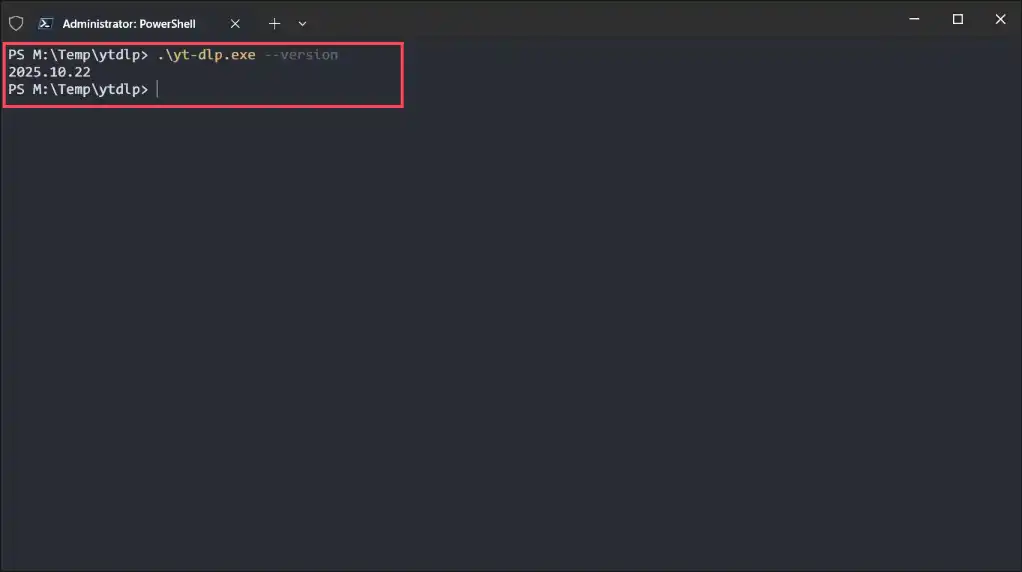
Install FFmpeg (You can skip this step if you already have FFmpeg installed and added to your system’s PATH environment variable)
Since Kick videos use the HLS mpegts format, FFmpeg is needed to convert them to MP4 format.
4.1. Go to the FFMPEG download page and find the version for your system. This guide uses the Windows version.
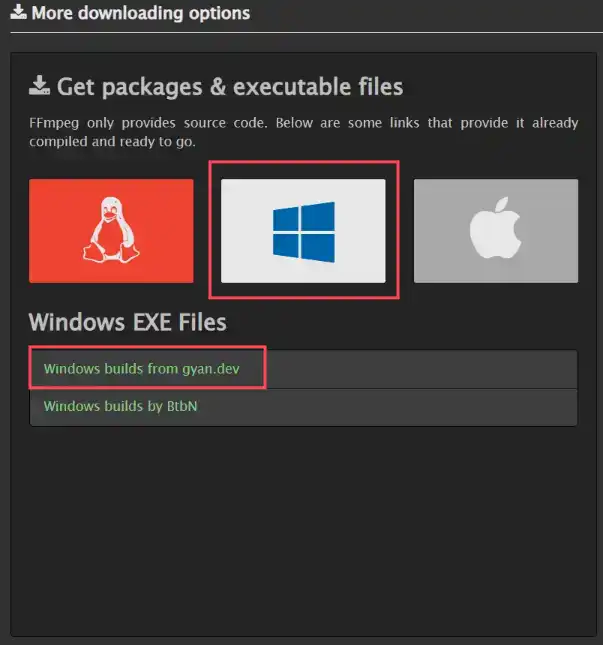
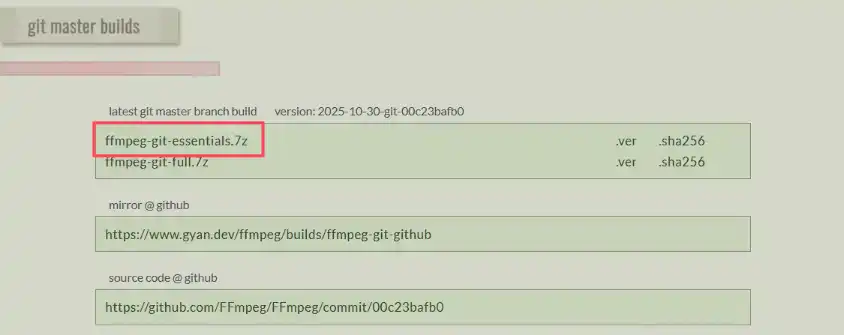
4.2. On the page, scroll down to find “ffmpeg-git-essentials.7z” and click to download the compressed package.
4.3. After downloading, extract it (if you don’t know how to extract, download 7-zip. After installing 7-zip or another extraction tool, right-click the downloaded FFmpeg archive and select 7-zip to extract). After extraction, enter the folder, find the bin folder, which contains three executable files:
- ffmpeg.exe
- ffprobe.exe
- ffplay.exe
We only need ffmpeg.exe.
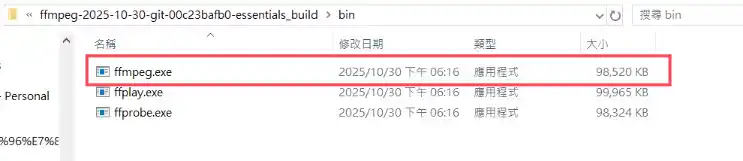
4.4. Copy ffmpeg.exe to the folder where you stored yt-dlp. This completes the installation.

- Download Clips
After confirming successful installation, enter the following command:
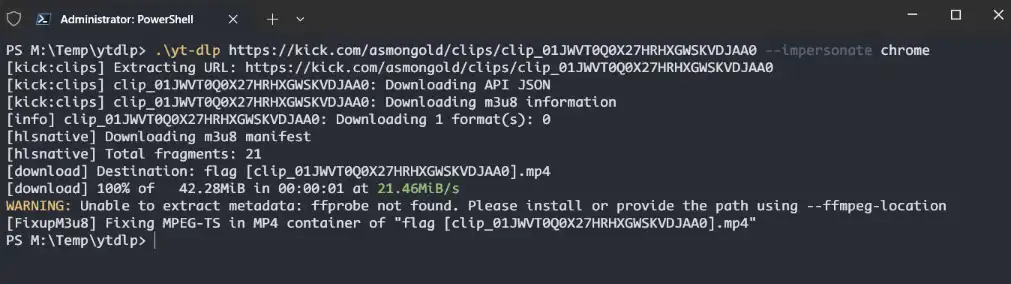
.\yt-dlp <The Kick Clip URL you want to download> --impersonate chromeFor example:
.\yt-dlp https://kick.com/asmongold/clips/clip_01JWVT0Q0X27HRHXGWSKVDJAA0 --impersonate chromeAfter a successful download, the video will be saved directly in the current directory.
- Download Live Stream Videos
After confirming successful installation, enter the following command to view available resolutions and formats:
.\yt-dlp -F <The Kick live stream URL you want to download> --impersonate chromeFor example:
.\yt-dlp -F https://kick.com/tazo --impersonate chromeUpon success, it will display all available formats for download, including resolution, codec, and other information.
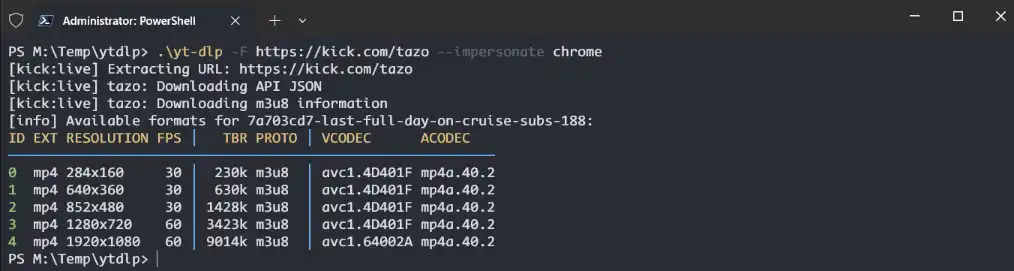
Copy the ID of the resolution you want to download, then enter the following command:
.\yt-dlp -f <ID> <The Kick live stream URL you want to download> --impersonate chromeFor example:
.\yt-dlp -f 4 https://kick.com/tazo --impersonate chromeAfter entering, live recording will start immediately. It will automatically stop when the live stream ends. To stop manually, press
Ctrl + C.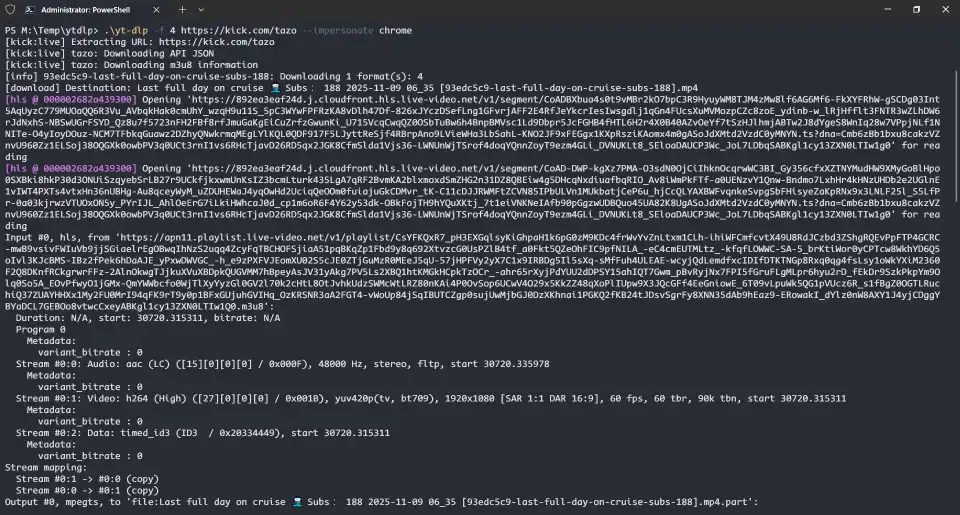
Article Summary
This article has detailed three practical tools for downloading Kick videos: online downloaders, browser extensions, and local open-source software. Each method has its unique advantages and suitable scenarios, catering to different user needs.
📊 Comparison of the Three Download Methods
- 🌐 Online Downloaders: No software installation required; usable with just a browser. Ideal for users who occasionally need to download videos.
- 🔌 Browser Extensions: Offer a more convenient operation experience. Once installed, you can download directly while watching videos, skipping the step of copying links.
- ⚙️ Open-Source Software (yt-dlp): Although the operation is more complex, it is the most powerful, supporting custom download options, and is completely free and open-source. Suitable for users with advanced video download requirements.
As of now, these tools are functioning normally and successfully downloading video content from the Kick platform. Users can choose the tool that best suits their habits, technical level, and specific needs.
💡 Our Recommendation
If you prioritize efficiency and convenience and don’t want to spend time learning complex command-line operations or downloading additional software, then using the Getvid Video Downloader directly is the best choice.
- ✨ Combines the convenience of online tools with the powerful functionality of browser extensions.
- 🚀 Ready to use with a simple installation.
- ⏱️ Saves you a significant amount of time and effort.
- 🎯 Makes downloading Kick videos easy and straightforward.